

HighlightGPT
Highlight any text in ChatGPT to ask, explain, translate, or save insights — without copy-paste.
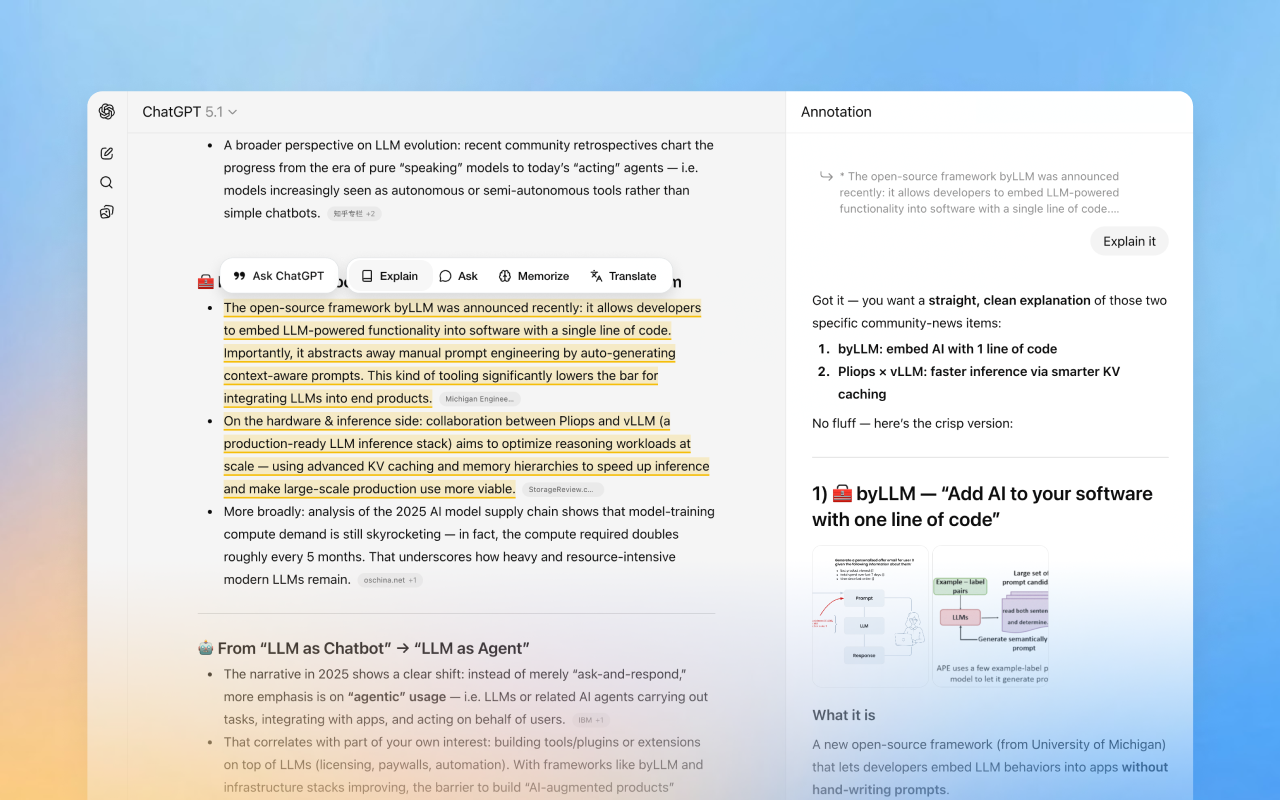 HighlightGPT is a lightweight browser extension that adds “highlight → ask” superpowers directly inside ChatGPT. Select any snippet (code, error, paragraph) and get instant follow-ups in a clean side panel — so you keep the main thread visible and never lose your place.
Key features
- Highlight any text in ChatGPT to ask questions or get explanations instantly
- One-tap actions: Ask / Explain / Translate / Save to memory
- Answers open in a slim side panel (no context switching)
- Works inside ChatGPT’s native web experience — no extra workflow to learn
- Optional Pro: remove ads, unlimited memory saves, early access to new features
Great for
- Debugging and understanding error messages
- Explaining unfamiliar code/config lines
- Reading long responses without losing context
Links
- Website: https://highlight.jiqiren.ai/
- Chrome Web Store: https://chromewebstore.google.com/detail/bdjccdhalfkaiolllkadcohhieboaain
- YouTube demo: https://www.youtube.com/watch?v=FI-QNyRPrQU